2B or not 2B ,That's a question.
Monday, October 29, 2012
SAP knowledge warehouse
http://help.sap.com/saphelp_46c/helpdata/en/51/954200a1fa11d189ba0000e829fbbd/frameset.htm
2B or not 2B ,That's a question.
2B or not 2B ,That's a question.

Work center hierarchy and capacity cumualtion .
In SAP system ,we can use work center hierarchy to group some work centers into a group . We use this hierarchy to distinguish which is superior the other work center, which is subordination .(Transaction code :CR21 to create a work center hierarchy CR23 for display )

In this Flow chart , work center SMDEU_B,SMDUS_B,SMDTX_B are shareing the capacity pool SMDB and subordinate to work center HSMD_UEB ,
Below is the capacity setting for 1 of those 3 work centers setting ,others are as same as this 1.

Another Group of work centers(SMDEU_A,SMDUS_A) have the similar infrastructure and setting .
Hence ,we can use CM01 to see the loading for work center respective or in the higher level .
Single work center view (CM01 ,work center SMDEU_A)

As we mentioned before, SMDEU_A SMDUS_A have common capacity pool SMDA ,so ,the requirement of capacity to SMDEU_A is also means to SMDEU_B, so check one of those 2 work center will get the same result as well .
Single work center view (CM01 ,work center SMDEU_B)

Ok,let's check the top work center HSMD in the hierarchy
Why the requirements is zero? cause that's no directly requirement to work center HSMD, so we should choose menu Setting-General, ticked Cumulation of reqmts and cumulation of capacity ,type the hierarchy to cumulate the requirement of capacity .

Now ,we can saw all requirement cumulate from subordination work centers .

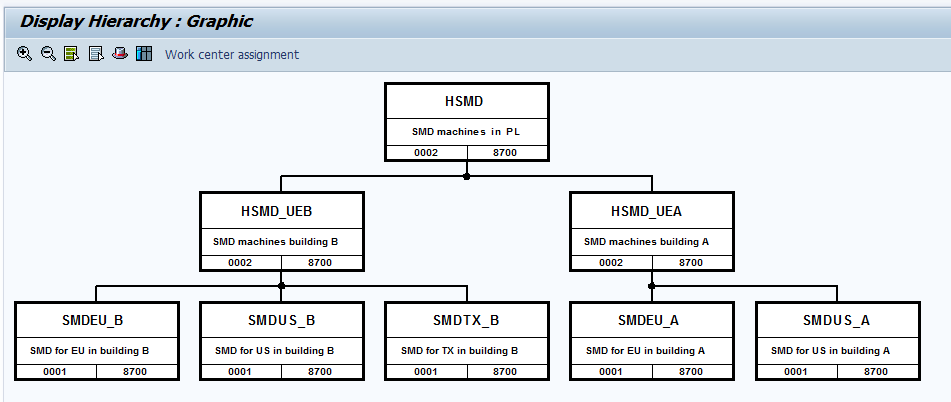
In this Flow chart , work center SMDEU_B,SMDUS_B,SMDTX_B are shareing the capacity pool SMDB and subordinate to work center HSMD_UEB ,
Below is the capacity setting for 1 of those 3 work centers setting ,others are as same as this 1.
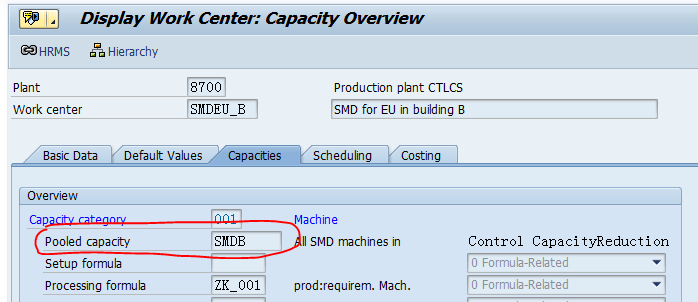
Another Group of work centers(SMDEU_A,SMDUS_A) have the similar infrastructure and setting .
Hence ,we can use CM01 to see the loading for work center respective or in the higher level .
Single work center view (CM01 ,work center SMDEU_A)

As we mentioned before, SMDEU_A SMDUS_A have common capacity pool SMDA ,so ,the requirement of capacity to SMDEU_A is also means to SMDEU_B, so check one of those 2 work center will get the same result as well .
Single work center view (CM01 ,work center SMDEU_B)

Ok,let's check the top work center HSMD in the hierarchy
Why the requirements is zero? cause that's no directly requirement to work center HSMD, so we should choose menu Setting-General, ticked Cumulation of reqmts and cumulation of capacity ,type the hierarchy to cumulate the requirement of capacity .

Now ,we can saw all requirement cumulate from subordination work centers .

分享反动歌曲一首《社会主义好?》
社会主义好?
社会主义好?
社会主义国家人民地位高?
反动派被打倒?
帝国主义夹着尾巴逃跑了?
全国人民大团结?
掀起了社会主义建设高潮?
建设高潮?
社会主义好?
社会主义好?
社会主义江山人民保?
人民江山坐得牢?
反动分子想反也反不了?
社会主义社会一定胜利?
共产主义社会一定来到?
一定来到?
共产党好?
共产党好?
共产党是人民的好领导?
说得到, 做得到?
全心全意为了人民立功劳?
坚决跟着共产党?
要把伟大祖国建设好?
建设好?
共产党好?
共产党好?
共产党领导中国富强了?
人民江山坐得牢?
反动分子想反也反不了?
社会主义社会一定胜利?
共产主义社会一定来到?
一定来到?
共产主义社会一定来到?
一定来到?
俗话说得好: 江山代有2B出,各舔菊花几百年!
Sunday, September 30, 2012
Error:Enter a valid lot size.
When we creation a new material ,system give a message: Enter a valid lot size. but seems everything is ok . so what happened?
Enter a valid lot size (materials planning)
Message no. M3497Diagnosis
The lot size specified in materials planning does not make sense here since quantity updating is not defined for the current material type in the plant specified.Procedure
Choose a lot size for which the lot-sizing procedure "lot-for-lot order quantity" is defined.According to this clue ,we found that we didn't maintained quantity and values update in this new plant .
IMG path:
Logistic - > Material Master -> Basic Setting -> Material Master -> Define attribute of Materials -> Quantity/Value Updating .
After you done this step ,this error will be eliminate .
Saturday, September 29, 2012
Copy special customizing from source system
Sometimes ,we just need copy customizing from source system by transport request, so, in this case ,we can use SCC1 done them .
How to maintain new characteristics value for batch class
Go to CL02,type the class name and class type

Click on the "Char." Tab .
Select the characteristics name that you wanna to maintain,such as "LI"

Click on the "Char." Tab .
Select the characteristics name that you wanna to maintain,such as "LI"
And press "Overwrite Value", insert your new value .and press save,done.

Caution: this value didn't add to the value of charts for CT04 screen.
Caution: this value didn't add to the value of charts for CT04 screen.
Subscribe to:
Posts (Atom)